01 / Before you begin
Before you begin
Start from a clear visual reference
Choose an image with an identifiable subject and a deliberate composition. A clear reference makes it easier to judge the result than an image filled with tiny text or several competing visual ideas.
Describe what should move
Distinguish subject movement from background or camera movement. If preserving the original atmosphere matters, begin with a restrained action rather than asking for a large transformation immediately.
Choose between animation and arrangement
AI generation invents a moving interpretation of the image. If you want to arrange the original photos with controlled timing, use Slide. Choose image-to-video when imagining new motion is the point of the project.
02 / Follow these steps
Follow these steps
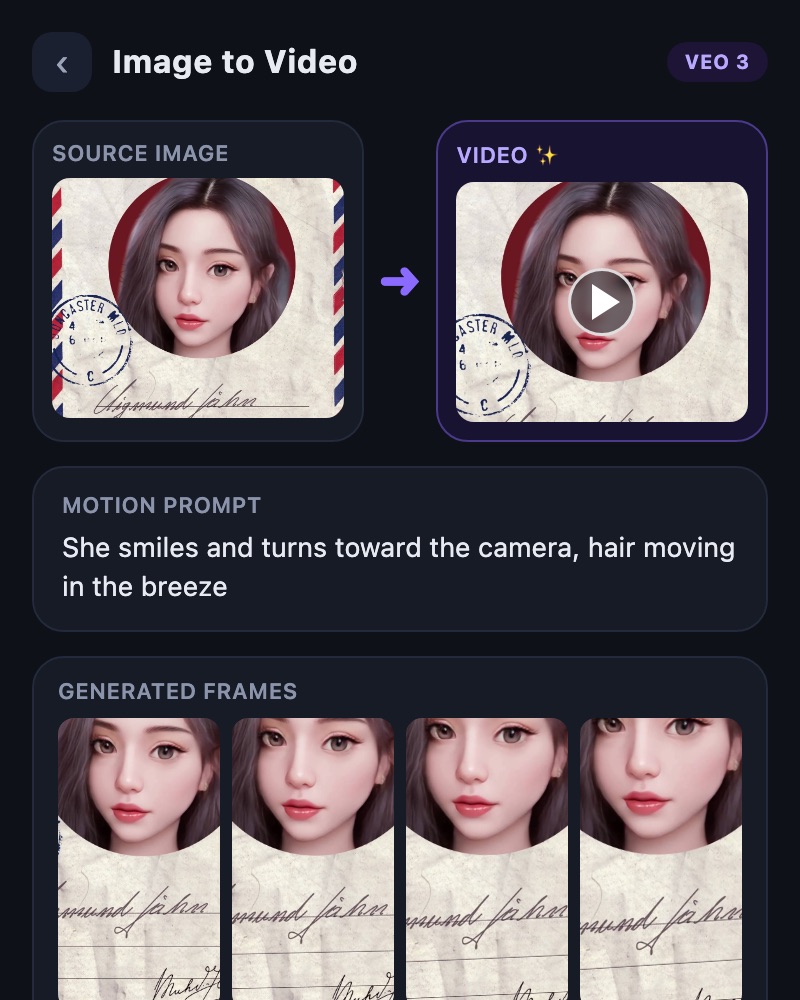
Open image-to-video and select a reference image.
Describe the desired movement and review supported options and ticket cost.
Check the subject and motion in the result, save it and refine it in the editor.
03 / Try this sequence
Try this sequence
For a garden photo, try a small movement such as flowers shifting gently in the breeze while the camera advances slowly. Review how the generated motion fits the image before using it alongside another scene. The original photo remains a reference, not a promise of frame-by-frame fidelity.
Before you export
- Is the subject clear in the source image?
- Have you checked that key product details and faces remain suitable?
- Have you kept the original image separately from the result?
Frequently asked questions
Will the original image remain unchanged?
Generated motion may alter subjects or details. If faithful preservation is essential, inspect the result carefully and consider a slideshow workflow.
Is this a slideshow of several photos?
This tool generates motion from a reference image. Use Slide when you want to arrange several photos with music, text and transitions.
Available tools and export settings vary by app version and device. Check the app for the terms of AI generation and cloud processing.