


Breathe New Life Into Old Footage: My Experience with TOVA AI Video Quality Enhancer
Hello fellow enthusiasts and memory-keepers! Today, I’m thrilled to share my latest discovery in the world of video upscaling: TOVA AI Video Quality Enhancer. If you’re anything like me, you probably have countless hours of precious footage tucked away—whether from family gatherings, special travels, or nostalgic VHS tapes. While these clips hold invaluable memories, their quality may leave much to be desired.
I’ve always wanted a tool that could transform grainy, blurry videos into high-definition masterpieces. Thankfully, TOVA has answered my prayers (and my pixelated nightmares). Below, I’ll walk you through how TOVA harnesses the power of AI to upscale your favorite videos from SD to HD, why it stands out among other solutions, and how to get started in just a few clicks.
Enhance Now
Ready to see what TOVA can do? Click here to try TOVA AI Video Quality Enhancer for free!

Table of Contents
- Understanding Video Resolution
- The Limitations of Traditional Video Editing
- The Magic of AI Video Quality Enhancement
- What Makes TOVA’s AI Video Quality Enhancer Stand Out?
- How To Enhance Video Quality With TOVA
- Improve Video Quality With TOVA
Understanding Video Resolution
Before diving into TOVA’s advanced features, let’s go over one essential concept: resolution. A video’s resolution determines how many pixels fill each frame. More pixels equate to greater detail, resulting in a crisper, clearer image.
Standard Definition (SD)
Many of us still have old VHS tapes or recorded clips in Standard Definition (SD). These often appear as blocky or grainy, which may have been acceptable years ago but doesn’t stand up to modern HD standards.
Common SD resolutions include:
- 480i: Interlaces two fields of 240 lines each, leading to potential interlacing artifacts in fast-moving scenes.
- 480p: A progressive scan version displaying all 480 lines at once, eliminating many of the artifacts seen in 480i.
Takeaway: SD resolution holds plenty of sentimental value but often looks underwhelming on today’s high-resolution displays. Facial expressions, textures, and small details are easily lost in the blur.
High Definition (HD)
Fast forward to the rise of high-definition (HD) video:
- 720p: With 720 lines of vertical resolution, viewers enjoy a noticeably sharper image and enhanced detail.
- 1080p: Boasting 1080 vertical lines, this standard offers exceptional clarity. You’ll see subtle nuances like expressions and textures that SD just can’t capture.
Takeaway: Upscaling your old SD footage to HD lets you appreciate the finer details you once missed, making those cherished memories all the more vivid.
The Limitations of Traditional Video Editing
You may wonder, “Can’t I just use ordinary video editing tools to sharpen or upscale my footage?” While traditional software can help, their methods have inherent drawbacks:
- Simple Upscaling: Merely stretching the frame without creating new pixel information leads to pixelation and blurriness.
- Sharpening Filters: Over-sharpening can introduce unwanted artifacts and noise.
- Color Correction: While color correction enhances vibrancy and balance, it can’t replace missing detail in a low-resolution video.
Takeaway: Traditional methods can only do so much. To truly elevate the quality of old or blurry videos, you need a more sophisticated, AI-driven approach.
The Magic of AI Video Quality Enhancement
AI-powered video enhancers like TOVA work by analyzing each frame, “filling in the blanks,” and creating new pixels to achieve sharper resolution. Here’s how:
- Intelligent Upscaling: Machine learning algorithms “guess” where extra pixels should go, producing a crisper HD version without the typical stretch artifacts.
- Denoising: AI actively identifies and removes graininess and noise, making your footage cleaner.
- Smart Sharpening: Edges and details are enhanced with precision, minimizing distracting artifacts.
- Color Correction: AI adjusts colors on a frame-by-frame basis to improve realism and vibrancy.
By combining these AI-powered features, TOVA can drastically improve your video—from a grainy SD clip to something you’d swear was filmed in HD.
What Makes TOVA’s AI Video Quality Enhancer Stand Out?
I’ve tested more than a few video enhancement tools, and TOVA truly shines due to these benefits:
1. Unmatched Upscaling
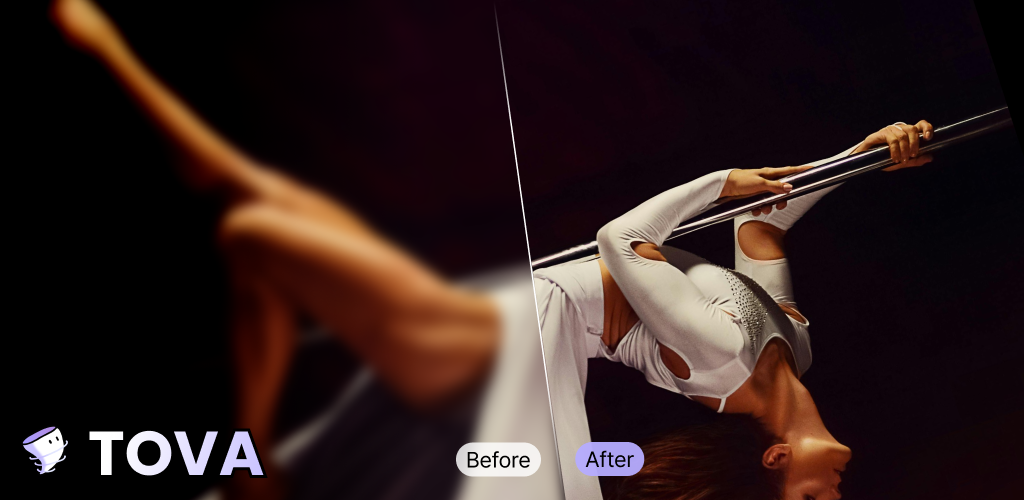
TOVA’s advanced AI engine goes beyond simple pixel stretching. When I used it to convert a 480p video to 1080p, TOVA’s algorithm recognized patterns and intelligently added new pixel data. The result? A crystal-clear video free from ugly pixelation or blurry sections.
2. Noise Reduction
Footage shot in low light or with a shaky hand typically comes with plenty of noise. TOVA’s AI-based denoising systematically cleans up this interference, resulting in a professional-looking final product.
3. User-Friendly Finesse
Not everyone wants to spend hours learning complicated software. TOVA’s straightforward interface allows you to upload your clip, apply enhancements, and preview the transformation with minimal effort. Even if you’re new to video editing, the process is a breeze.
Takeaway: TOVA’s AI is robust enough for the pros yet user-friendly for beginners. No more fumbling through complex tools and no format compatibility headaches.
How To Enhance Video Quality With TOVA
Getting started with TOVA’s AI Video Enhancer is straightforward:
-
Upload Your Video
Go to the TOVA website and head over to the AI Video Enhancer section. Click “Upload” and pick the file you want to upscale. -
Watch the AI Magic Unfold
After uploading, TOVA gets to work. It’ll analyze and enhance your footage using AI. The preview window lets you compare the original clip side-by-side with the newly improved version. -
Download and Share
If you’re pleased with the results (which I’m sure you will be!), hit “Download.” You can save a short preview or the full HD version in resolutions up to 1440×2560px.
Enhance Now
Upload and Enhance Your Video with TOVA AI!
Improve Video Quality With TOVA
Gone are the days when old footage is doomed to remain fuzzy and unwatchable. TOVA has become my go-to tool for breathing new life into treasured videos—from nostalgic home movies to creative social media projects.
Whether you’re a seasoned video editor or a total beginner, TOVA has your back. Enjoy:
- Upscaling to 4K: When you’re ready to push quality even further.
- Brightening and Color Correction: Perfect for poorly lit recordings.
- Noise and Grain Removal: Great for phone or camcorder footage shot on the fly.
Ready to experience the future of video enhancement? Download TOVA today and see how it can take your memories to a whole new level of clarity and detail.
Enhance Now
Try TOVA AI Video Enhancer and rediscover your most beloved moments!
Thanks for reading! If you’ve tried TOVA or have questions about enhancing your own videos, feel free to share your thoughts in the comments below. Happy upscaling!
Tova Contents
View Other Services
We would like to share with you useful other magic AI apps.